
Pet → Skin
Pet Minecraft Skin Maker: Turn Your Dog or Cat Into a Skin
Upload one photo of your dog, cat or parrot and Blocksona paints a 64×64 Minecraft skin of your pet standing on two legs: its face on the head, its coat on the body, paws where the hands go. It works in Java and Bedrock, and your first 3 skins are free.
One animal with its face visible, in good light.
Uses 1 creditNew accounts get 3 free credits.
Tips for a better skin
- Face the camera and fill most of the frame.
- Even daylight beats flash and filters.
- Use the notes to fix colors the photo gets wrong.
Your skin shows up here
Until then, meet Mika. Drag to spin.
How a four-legged pet becomes a two-legged Minecraft skin
Every Minecraft player has the same body: a head, a chest, two arms and two legs, all boxes. A skin only changes the colors on those boxes, never the shape. So a pet Minecraft skin is not a dog-shaped mob. It is your pet as a player, standing up. We call it a pet-sona.
In Pet mode, the AI works out which part of your pet belongs on which part of that body. Then it paints all 64×64 pixels in the layout Minecraft reads: front, back, sides, top, even the soles of the feet. Your pet looks right from every angle, and when it walks.
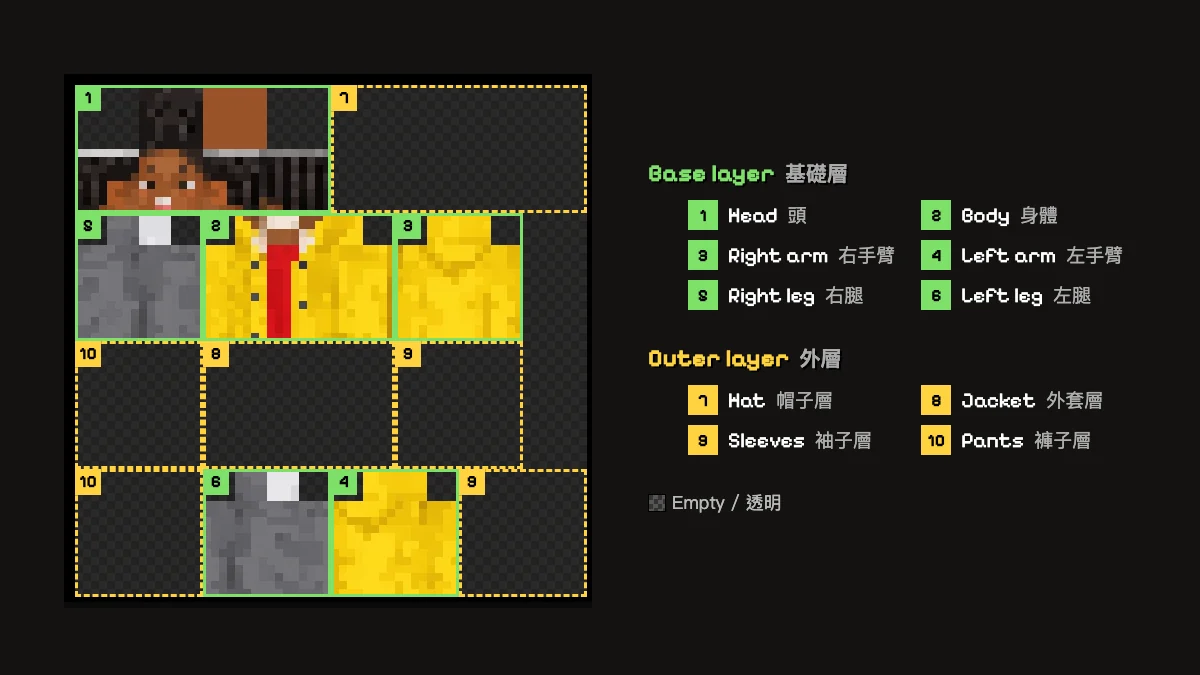
Where each part of your pet ends up
This is what happened in our four pet examples, so you know what to expect before you spend a credit.
| Your pet | On the skin | Seen in |
|---|---|---|
| Eyes, nose, muzzle | The front of the head, 8×8 pixels. | Mango's green eyes and pink nose |
| Ears | Painted at the top corners of the head. They cannot stick out, because a skin adds no extra pieces. | Mango's pink inner ears |
| Coat color | Chest, back, arms and legs. | Biscuit's orange shiba coat |
| Chest and face markings | The front of the body and head, where they show the most. | Pepper's white chest and white muzzle stripe |
| Stripes and patches | Spread over the body and limbs. | Mango's tabby stripes |
| Paws and feet | The ends of the arms and legs, soles included. | Biscuit's cream paws, Kiwi's grey feet |
| Feathers and wings | Feather colors cover the body and arms. Wing markings go on the back. | Kiwi's red and yellow flecks on the back |
| Tail | The player model has no place for one, so it is usually left out. | None of the four kept a tail |
Mango's white paws are the one detail that got lost: the arms and legs came out all orange. A note like "white paws" fixes that. See how below.
Dog, cat and parrot Minecraft skin examples
Four pet photos and the skins made from them, unedited. The animals in the photos were made with AI. Click a card to watch the skin walk in 3D.
Biscuit is a shiba inu, Mango an orange tabby cat, Pepper a black and white border collie, and Kiwi a green and yellow parrot with a red forehead. All four use Classic arms, which give sturdier paws.
How to turn your pet into a Minecraft skin
It takes one photo and 1 to 2 minutes in the Workbench.
- Step 1
Pick Pet mode and upload a photo
Choose Pet and drop in a JPG, PNG or WebP of one animal with its face visible. Your browser shrinks it to 1024 px first, so a photo straight from your phone is fine.
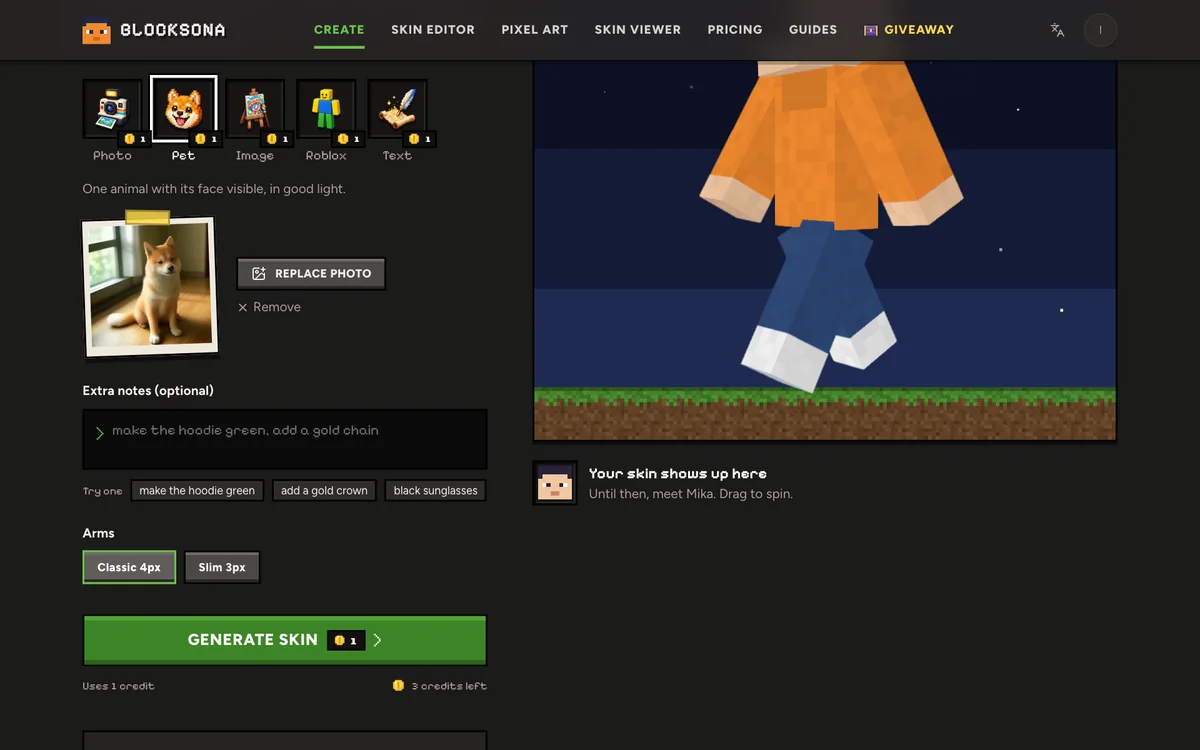
- Step 2
Write down what the photo cannot show
Use Extra notes (up to 400 characters, free) for markings that are hidden or easy to miss: "white paws", "black patch over the left eye", "pink nose". You can dress your pet up too: "red collar with a gold tag", "blue bandana", "tiny wizard hat".
- Step 3
Pick the arms
Classic (4 px) gives thicker legs and paws, Slim (3 px) a lighter build. Either works for a pet. Choose before you generate.
- Step 4
Generate and wait
Click Generate skin. It uses 1 credit, usually takes 1 to 2 minutes, and you can leave the page. A result that does not fit is repainted for free, and a failed one refunds your credit.
- Step 5
Watch your pet walk, then download
Switch the 3D preview to Walk and watch your pet stroll around. Download the PNG for Java or the .mcpack for Bedrock, or click Edit pixels to touch it up first.
Which pet photos work best
Pets do not pose, so take a few shots and pick the clearest one. The photo tips guide has more.
Works well
- The whole face in the frame, both ears included, so ear color lands on the head.
- Get down to your pet's eye level instead of shooting from above.
- Show the coat: a sitting or standing shot shows the chest, legs and paws.
- Daylight. Black and dark brown fur needs it most.
- Sharp and still. A treat held just above the camera helps.
Avoid
- Two pets in one photo, or your hand in the shot.
- A curled-up sleeping pet with its face hidden.
- Motion blur from a pet in mid-zoom.
- Flash: it makes eyes glow and flattens fur color.
- A dark room where a black coat turns into one blob.
Dogs, cats, birds and other pets
Pet mode takes one animal with a visible face. Each kind of pet has its own thing to watch for.
Dogs
Short and long coats both work. Markings are what make a dog recognizable, like Pepper's white chest and muzzle or Biscuit's cream paws, so get them in the photo. For a solid-colored dog, the face and ears do most of the work.
Cats
Tabby stripes, tuxedo bibs and calico patches come through as pixel patterns, like Mango's stripes. Long fluffy fur can hide a pattern, so describe it in Extra notes.
Parrots and other birds
Birds work too. Kiwi's red forehead, yellow face and grey beak went on the head, the green feathers on the body, and grey feet at the bottom of the legs.
Rabbits, hamsters and more
You can try any animal with a clear face: rabbits, guinea pigs, hamsters, ferrets, even horses. The less an animal looks like a two-legged player (a fish, a snake), the more the AI has to guess, so add notes.
Fix markings with notes and the skin editor
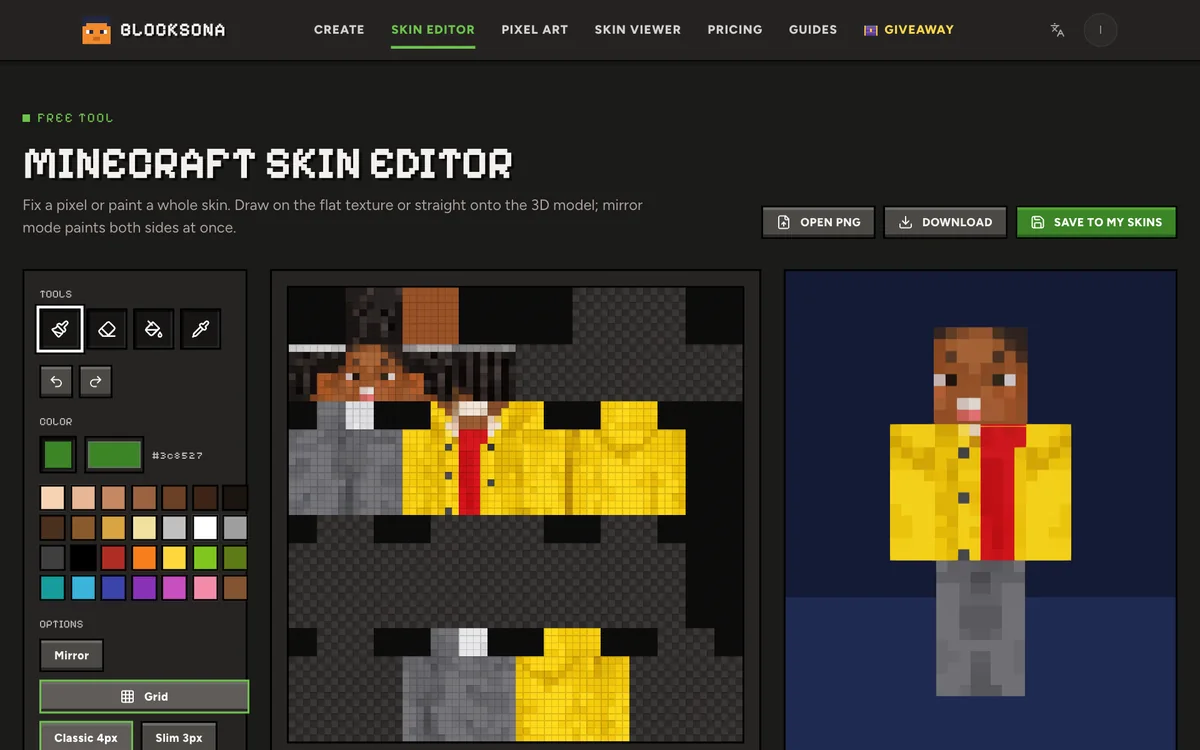
Mango shows the most common miss: small markings like white paws, a spot over one eye or a pink nose can get lost. If you have not generated yet, put them in Extra notes. If the skin is already made, click Edit pixels and paint them in the free Minecraft skin editor, without using a credit.
Pets are rarely the same on both sides, so a few editor habits help. The skin editor guide covers the rest.
- Turn Mirror (M) off for a patch on one side only, and on for matching paws.
- Use Pick color (I) to grab the fur color from the chest before you paint the paws, so they match.
- Hover the flat texture to see which body part each pixel belongs to.
- Paint collars and bandanas on the Outer layer. The Eraser only clears outer-layer pixels, so you can take them off later without touching the fur.
Play as your pet in Minecraft
Java Edition: download the PNG. In the Minecraft Launcher, open Skins → New skin, choose the arms you picked, click Browse, then Save & Use. Press F5 in a world to see your pet from the front. Step by step: install a skin on Java.
Bedrock on Windows, iPhone, iPad and Android: download the .mcpack and open it. Minecraft imports it by itself; pick it in Dressing Room → Classic Skins. If you touched the skin up in the editor, its Wear it in Minecraft panel has the same steps for each device. More help: install a skin on Bedrock.
Xbox, PlayStation and Switch cannot import skin files. And a pet skin changes how you look as a player. It does not change the game's own wolves, cats or parrots.

More ways to make a skin
- Photo to skinMake a skin of yourself from a selfie, to walk next to your pet.
- Image to skinHave a drawing of your pet, or a pet mascot? Image mode turns drawings into skins.
- Text to skinDescribe the pet you wish you had, like a cyber ninja cat with a glowing visor and a black scarf.
- Pixel art makerBuild your pet's portrait in wool, concrete or terracotta, with the exact block list.
- Pricing1 credit makes 1 skin. Packs start at $4.99 for 20, enough for every pet in the house.
- Creator challengeTurn your pet skin into a reveal video and win gift cards or credits.
FAQ
Questions people ask
Can I make a Minecraft skin of my dog?
Yes. Pick Pet mode in the Workbench and upload a clear photo with your dog's face and ears in it. In 1 to 2 minutes you get a 64×64 skin of your dog on two legs, with its coat and markings.
Does it work for cats?
Yes. Tabby stripes, white chests and calico patches carry over as pixel patterns. Check small details like white paws in the 3D preview, and add them with Extra notes or the skin editor if they are missing.
Will the skin look like my pet or like a person?
Like your pet standing up. The body is always the Minecraft player shape, and the face, ears, coat and paws are painted onto it. It will not have four legs or a tail sticking out.
Can I make a skin of a bird, rabbit or hamster?
Yes, as long as it is one animal with a clear face. Kiwi the parrot is one of our examples. The less the animal looks like a player, the more the AI has to guess, so put the details that matter in Extra notes.
Can I put two pets in one skin?
No, one animal per skin. Two pets in one photo get mixed up, so crop each one and make two skins.
How much does a pet Minecraft skin cost?
One credit. New accounts get 3 free credits, and packs start at $4.99 for 20. Extra notes and the skin editor are free. See pricing.
Is my pet's photo kept?
No. It is used for that one skin and deleted automatically within 24 hours, and it is never used to train models. The finished skin stays in your private My skins library.
Can I play as my pet on Xbox, PlayStation or Switch?
Not with a custom file, because consoles cannot import skins. Java Edition on PC or Mac, and Bedrock on Windows, iPhone, iPad and Android, can.
Does this change the dogs and cats in my Minecraft world?
No. It is a player skin, so it changes how you look. Tamed wolves, cats and parrots in the game keep their normal look.
Should a pet skin use classic or slim arms?
Either. Classic arms are 4 pixels wide and look sturdier; Slim arms are 3 pixels wide. All four of our pet examples use Classic.
Guides
Read next
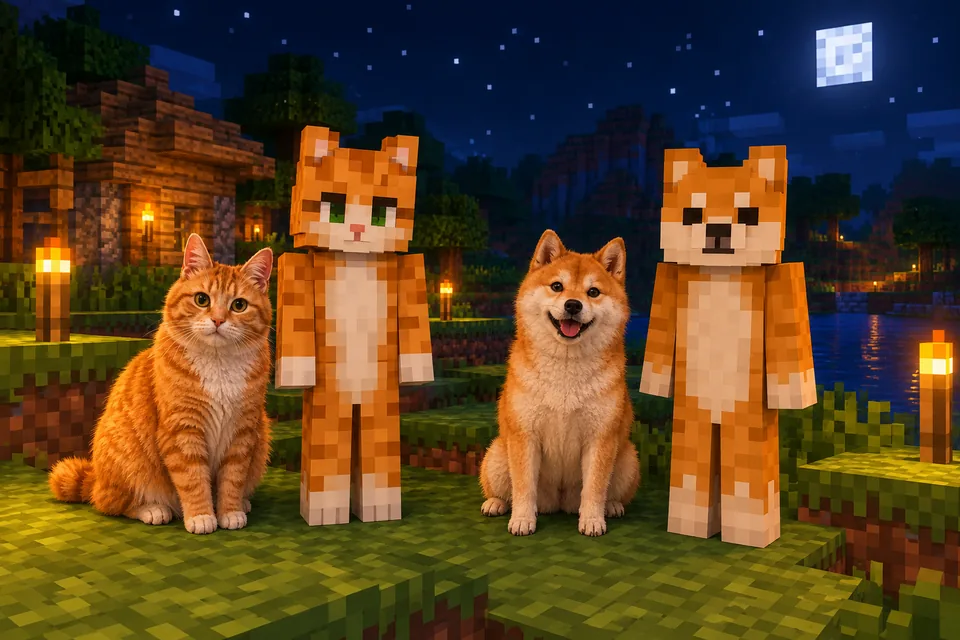 How to make a Minecraft skin of your pet (dog, cat, bird and more)Turn your dog, cat or parrot into a Minecraft skin you can wear. Photo tips, Pet mode steps, real examples, coat and breed tips, and a matching owner skin.
 Best photo for an AI Minecraft skin: 5 rules with examplesA Minecraft face is 8×8 pixels, so the photo matters. Five rules, real before and after examples, tips for pets, drawings and Roblox, and a quick checklist.
 How to use a Minecraft skin editor: edit any skin pixel by pixelA step-by-step tutorial for the free Blocksona skin editor: open a skin, read the 64×64 map, use every tool and shortcut, shade it, and wear it in game.
 How to import a custom skin in Minecraft Bedrock (Windows, iPhone, Android)Import a custom skin in Minecraft Bedrock with a one-tap .mcpack or a PNG in the Dressing Room. Steps for Windows, iPhone, iPad and Android, plus consoles.
Further reading
Outside sources, for the details behind this page.
- Minecraft Wiki: PlayerWhy every skin, a pet one included, sits on the same two-legged player model.
- Minecraft Wiki: SkinThe 64×64 texture map that shows where the head, body, arms and legs are painted.
- Minecraft Wiki: Character CreatorHow the Bedrock Dressing Room works, which is where your imported pet skin shows up.
By the Blocksona teamUpdated