
How to make a Minecraft skin of your pet (dog, cat, bird and more)
Turn your dog, cat or parrot into a Minecraft skin you can wear. Photo tips, Pet mode steps, real examples, coat and breed tips, and a matching owner skin.
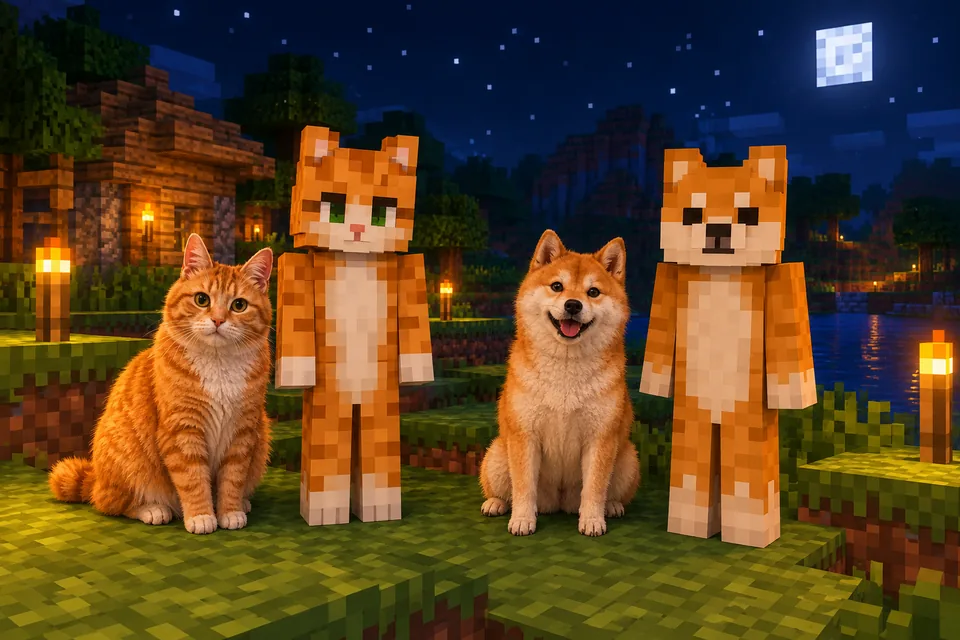
A Minecraft skin of your dog or cat is not a dog-shaped mob. Every skin uses the same player body as Steve, so your pet becomes a "pet-sona": it stands on two legs, wears its own fur, and has its face on the front of the head. Blocksona's Pet to Minecraft skin mode makes one from a single photo in 1 to 2 minutes. This guide covers the photo, the steps, four real pet skins, tips for spots, stripes and long fur, birds and small pets, hand fixes for ears and collars, and a matching skin for you.
What a pet skin can and cannot show
Here is what Pet mode puts on the 64×64 skin:
- The face (eyes, nose, muzzle markings) on the 8×8 front of the head.
- The ears as two small patches of ear color in the top corners of the face.
- The coat: its colors and markings wrapped around the whole body, back and soles included.
- Paws: the arms end in paws and the legs in paws or feet, in your pet's colors.
The limit is the body itself. A Minecraft player is always a cube head, a box body, two arms and two legs (the Minecraft Wiki player page lists the exact parts). There is no tail, no snout that sticks out, no floppy ears and no wings. Those can only be hinted at with color, which is why getting the face and coat right matters so much.
Take a pet photo the AI can read
The general rules (one subject, daylight, no filters) are in the photo checklist. Pets need a few extra tricks:
- Get down to their eye level. Hold the phone at nose height. Shots from above shrink the face and make the head look like a big blob of fur.
- Hold a treat just above the lens. Your pet looks at the camera, which puts both eyes on the face.
- Keep both ears in the frame. Cropped ears mean no ear color on the head.
- Show some coat. A sitting pose with the chest and front paws visible gives the AI the chest patch, paw color and stripes. Mango's photo below is a good model: the whole cat, sitting, facing the camera.
- Give dark pets more light. A black dog's eyes disappear in a dim room. Try near a window or outside in the shade.
- Use burst mode. Wriggly pets blur. Take ten shots and keep the sharpest.
- Skip the sweater. Clothes and harnesses hide markings. Take the photo without them and add them back with a note if you want.
Make the skin in Pet mode
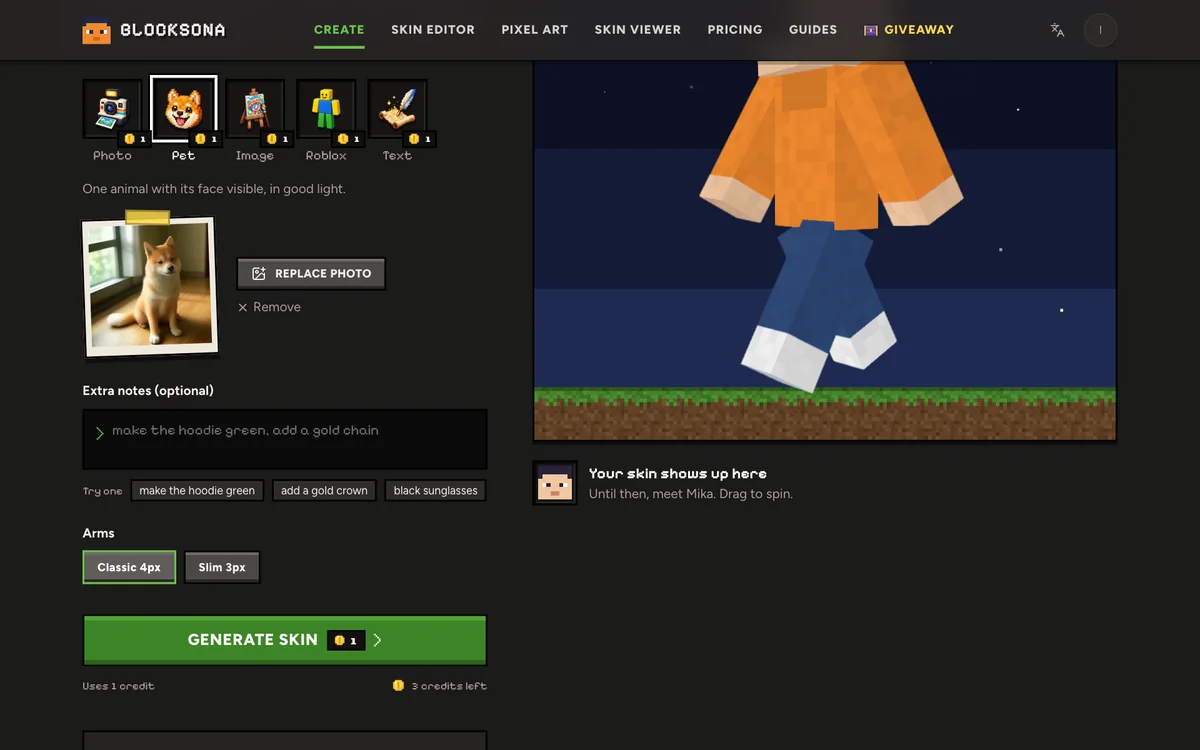
- Open Pet to Minecraft skin, or the Workbench and pick Pet.
- Drop in the photo (JPG, PNG or WebP). One animal only.
- Use Extra notes for what the photo does not show well: "white paws", "red collar with a gold tag", "one blue eye and one brown eye", "pink inside the ears". Up to 400 characters, no extra cost.
- Pick Classic 4px or Slim 3px arms. All four examples below use Classic, which gives chunkier paws.
- Press Generate skin. It uses 1 credit (new accounts get 3 free) and usually takes 1 to 2 minutes. A failed try refunds itself.
- Drag the 3D preview around to check the back, then press Download PNG or Download .mcpack.
Four pet skins and what each one kept
These are unedited results. The animals in the photos were made with AI. Open a card to compare the photo with the skin in 3D.
- Biscuit (shiba inu): an orange coat with a cream stripe running down the chest, a cream muzzle, black eyes and nose, cream paws, and the ear tips as small patches in the top corners of the face.
- Mango (orange tabby cat): darker stripes across the arms, legs and back, green eyes, a pink nose and pink ear tips, and a white bib on the chest. One miss: the white paws from the photo did not come through on the front. A note like "white paws" or two minutes in the editor fixes it.
- Pepper (border collie): a mostly black coat with a white blaze and chest, brown eyes, and white feet and hands with dark claw marks.
- Kiwi (parrot): a green body with a yellow chest, the red forehead across the top of the face, a grey beak as a few pixels in the middle, and grey feet. The wings simply became green arms.
Tips for spots, stripes, tuxedos and long fur
Every coat survives the jump to 64×64 a little differently. A short note helps when the pattern is the whole point.
| Coat | What happens at 64×64 | A note that helps |
|---|---|---|
| Spots (Dalmatian, spotted mixes) | Spots become 1 or 2 pixel blobs; small ones can merge | "big black spots on white fur, spots on the ears" |
| Tabby stripes | Darker bands on the arms, legs and back, like Mango's | "dark stripes on the arms and legs, M on forehead" |
| Tuxedo (black with white) | Black body, white chest; white paws can get lost | "white chest, white chin, white paws" |
| Calico or tortoiseshell | Patches get bigger and fewer | "white body with big orange and black patches" |
| Long fur (Pomeranian, Persian) | Fluff turns into lighter and darker pixels; outline stays blocky | "fluffy cream fur, lighter around the neck" |
| Very dark coat (black lab, Rottweiler) | Eyes and nose can vanish into the fur | "amber eyes, tan eyebrow dots, tan paws" |
| Merle or brindle | Busy patterns become a rough texture | "grey and black merle, white chest" |
Birds, rabbits and other small pets
Pet mode works with any one animal whose face is visible, fur or feathers.
- Birds: Kiwi shows how it goes. The beak becomes a few pixels in the middle of the face, a colored crown or forehead lands on the top rows, and the wing color covers the arms. For a cockatiel, try "yellow crest and round orange cheek patches". For a budgie, "blue body, black ripples on the head".
- Rabbits: long ears cannot stand up off a cube head, so they become ear color at the top corners. For lop ears, add "brown ears hanging down the sides of the head".
- Hamsters, guinea pigs, rats: they are tiny in most photos. Get close, or crop until the face fills most of the frame.
- Reptiles and fish: there is less face to read, so the result looks more like a costume in their colors. Text mode gives you more control here, for example "a green iguana person with orange spikes painted down the back".
Fix ears, collars and paws in the editor
On the result screen, Edit pixels opens your pet skin in the free Minecraft skin editor.
- Ears: ear color sits in the top corners of the face. To make ears stand out, paint a 2×2 patch in each top corner and carry it onto the top of the head so it shows from above. Add one pink pixel inside each for a cat.
- Collar: the neck is the top row of the body. Paint that row on the front, back and both sides (8 + 8 + 4 + 4 = 24 pixels), with one gold pixel in the middle of the front for the tag. Paint it on the Outer layer and it stands slightly proud of the fur.
- Paws and claws: the bottom row or two of each arm and leg. Pepper's claws are single dark pixels on white feet.
- One-sided markings: for a patch over one eye or a spot on one ear, switch Mirror off first, or it appears on both sides.
- A tail hint: a 2-pixel-wide strip of tail color down the lower back.
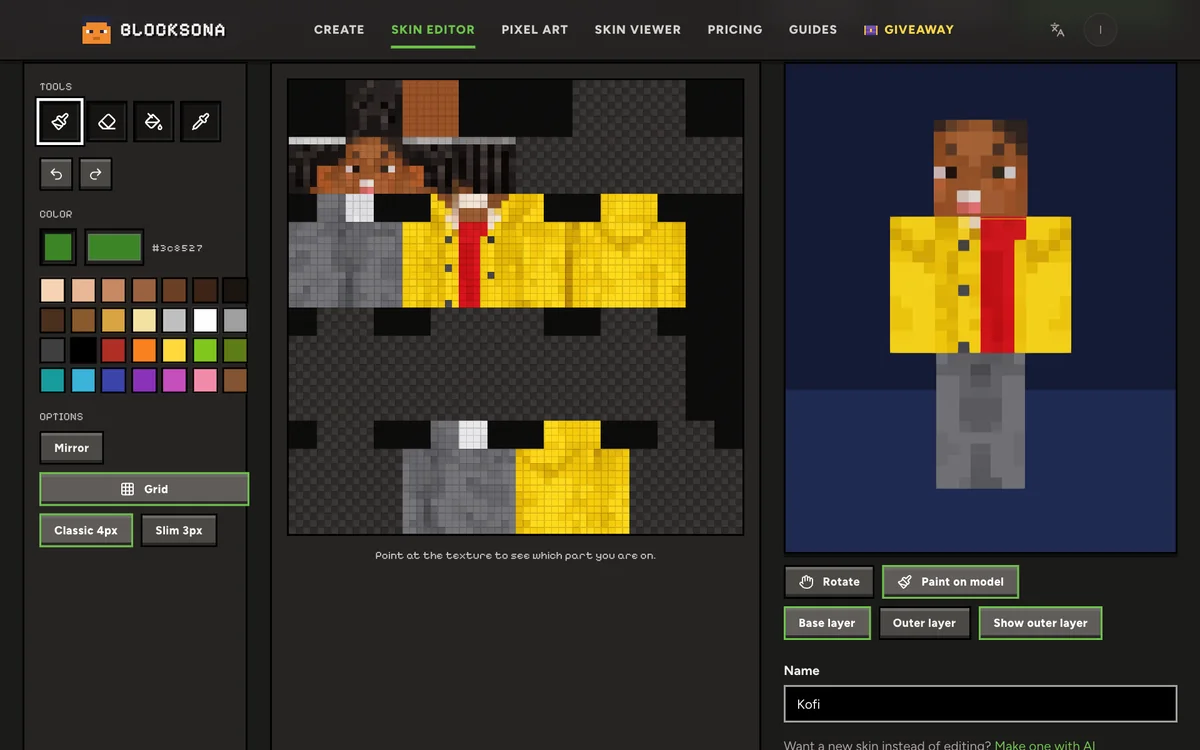
Paint on model is the easiest way to place a collar, because you can rotate the body and see where the head meets the neck.
Make a matching skin for you and your pet
Make yours from a selfie in Photo mode; the guide to making a skin of yourself has the full steps. Then tie the two together:
- With Extra notes: "orange hoodie the same color as a shiba, cream sleeves", "red bandana like my dog's collar", "black and white checked shirt".
- With exact colors: open the pet skin in the editor and use Pick color (I) on the coat. The hex code (like #d9822b) shows next to the color box. Write it down, open your own skin, type it into the color picker and paint your hoodie or shoes in that color.
Matching pairs look great side by side in a screenshot, and even better in a video.
Share your pet skin in the creator challenge
Pet skins make good reveal videos because the before and after are obvious. Press Make my video on the result screen or the creator challenge page and Blocksona builds an 8-second vertical video in your browser: the pet photo, the AI step, then the skin walking in 3D. Post it on TikTok, YouTube Shorts or Instagram Reels with blocksona.com in the caption and #ad, keep it public, and submit the link. Each round, winners get a $25 gift card or free credits. Social apps have age limits, so younger players can ask a parent to post it.
FAQ
Can I make a Minecraft skin of my dog for free?
Yes. New accounts get 3 free credits, and one pet skin uses one. More credits are on the pricing page.
Does a pet skin work in Java and Bedrock?
Yes. It is a normal 64×64 skin. Follow the Java install guide or the Bedrock install guide. On Bedrock it shows up in the Dressing Room, which the Minecraft Wiki's Character Creator page explains in detail. Consoles cannot import skin files.
Can I put two pets in one skin?
No. One photo, one animal. Make a skin for each pet, then switch between them in game.
What happens to my pet's photo?
Blocksona only uses it to paint this one skin. The photo is removed automatically within 24 hours and never goes into training a model, while the finished pet skin stays in My skins until you delete it.
Can I turn my pet into pixel art instead?
Yes. The free pixel art maker turns the same photo into a block picture you can build in your world, with a list of every block you need.